
CSS :has() is the long-awaited parent selector, you can finally style parent elements based on their children. No more JavaScript hacks, no workarounds, just pure CSS. And yes, it works in all modern browsers.🤔 Why CSS Never Had a Parent Selector
If you've been writing CSS for any length of time, you know the pain. You want to style an element, but the condition depends on a child element. Highlight a form when an input is invalid? Adjust a card layout when an image is present? Classic scenario, and classically impossible with CSS.
The reason was simple: performance. Browsers render CSS from right to left. A parent selector would have meant the browser had to traverse the entire DOM tree upward for every element. That was a hard no for a long time.
But browser engines got better. Way better. And so :has() was born.
🚀 What Is :has() and How Does It Work?
With :has(), you can select an element that contains a specific child element. You're essentially saying: "Select the element that has this child."
/* Select every div that contains a p element */
div:has(p) {
  border: 2px solid blue;
}

/* Select every article that contains an img */
article:has(img) {
  grid-template-columns: 1fr 1fr;
}
The genius part: :has() isn't just a parent selector. It's a relational selector. You can use any selector logic inside it.
/* Select a label whose next sibling is a :checked input */
label:has(+ input:checked) {
  font-weight: bold;
  color: green;
}
💻 Practical Examples
Form Validation Styling
Instead of using JavaScript to toggle classes, you can now react directly to the state of your inputs with pure CSS.
/* Red border on fieldset when it contains an invalid input */
fieldset:has(input:invalid) {
  border-color: red;
  background: #fff0f0;
}

/* Green fieldset when all inputs are valid */
fieldset:has(input:valid):not(:has(input:invalid)) {
  border-color: green;
  background: #f0fff0;
}

/* Visually disable submit button */
form:has(input:invalid) button[type="submit"] {
  opacity: 0.5;
  pointer-events: none;
}
Dynamic Card Layouts
Imagine a card component. Sometimes it has an image, sometimes it doesn't. With :has(), you adjust the layout automatically.
.card:has(img) {
  display: grid;
  grid-template-columns: 200px 1fr;
}

.card:not(:has(img)) {
  padding: 2rem;
}

/* Card with video gets more space */
.card:has(video) {
  grid-column: span 2;
}
Navigation Highlights
/* Highlight nav item when it contains the active link */
nav li:has(a.active) {
  background: #e0e7ff;
  border-radius: 8px;
}

/* Rotate dropdown arrow when submenu is open */
nav li:has(.submenu:not([hidden])) > .arrow {
  transform: rotate(180deg);
}
⚙️ Combining with Other Selectors
The true power of :has() unfolds when you combine it with :not(), :is(), and :where().
/* Element that does NOT contain an image */
.card:not(:has(img)) {
  min-height: 200px;
}

/* Element that contains either an img OR a video */
.card:has(:is(img, video)) {
  aspect-ratio: 16 / 9;
}

/* Zero-specificity variant with :where() */
.card:has(:where(img, video)) {
  overflow: hidden;
}
You can even nest :has(), yes, really:
/* Section containing a card that contains an image */
section:has(.card:has(img)) {
  padding: 2rem;
}
🎨 Real-World Use Cases
Has a Checked Checkbox
/* Highlight row when checkbox is checked */
tr:has(input[type="checkbox"]:checked) {
  background: #e0f2fe;
}

/* Dark mode toggle without JavaScript */
body:has(#dark-mode:checked) {
  --bg: #1a1a2e;
  --text: #e0e0e0;
  background: var(--bg);
  color: var(--text);
}
Has an Empty Input
/* Placeholder styling when input is empty */
.form-group:has(input:placeholder-shown) label {
  color: #999;
  transform: translateY(0);
}

/* Floating label effect */
.form-group:has(input:not(:placeholder-shown)) label {
  transform: translateY(-1.5rem);
  font-size: 0.75rem;
  color: #3b82f6;
}
Has a Specific Child Element
/* Show sidebar only when it has content */
.layout:has(.sidebar:not(:empty)) {
  grid-template-columns: 1fr 300px;
}

.layout:not(:has(.sidebar:not(:empty))) {
  grid-template-columns: 1fr;
}

/* Figcaption spacing only when present */
figure:has(figcaption) img {
  margin-bottom: 0;
  border-radius: 8px 8px 0 0;
}
⚠️ Performance Considerations
Yes, :has() is powerful. But with great power comes great responsibility.
A few ground rules:
- Avoid overly broad selectors.
:has(div)on thebodyforces the browser to scan the entire DOM. - Be specific.
.card:has(> img)(direct child) is more performant than.card:has(img)(any depth). - Use the direct child combinator
>wherever possible. - Test with large DOMs. What runs smoothly with 50 elements might stutter with 5000.
/* ❌ Too broad – potentially slow */
div:has(span) { ... }

/* ✅ Specific and performant */
.card:has(> .card-image) { ... }
🛡️ Browser Support
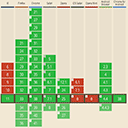
:has() is supported by all modern browsers:
| Browser | Version | Since |
|---|---|---|
| Chrome | 105+ | August 2022 |
| Firefox | 121+ | December 2023 |
| Safari | 15.4+ | March 2022 |
| Edge | 105+ | August 2022 |
Safari was actually the trailblazer here, unusual, but welcome. Firefox took a bit longer, but since late 2023 all major browsers are on board.

💡 Conclusion
CSS :has() isn't hype, it's a game changer. For years we've been building JavaScript workarounds, toggling classes back and forth, and wrestling with the cascade model. That's over now.
You can style parent elements, react to the state of child elements, and implement complex UI logic directly in CSS. Browser support is there, performance is solid (if you do it right), and the possibilities are endless.
So go ahead, start using :has(). Your CSS will thank you.