
In 3D printing, filament quality plays a crucial role. Moisture absorption is particularly problematic, as it can lead to print defects. The Sunlu S4 Filament Dryer offers a solution to minimize these issues and significantly improve print quality. In this article, you'll learn everything important about the Sunlu S4 Filament Dryer and how it can optimize your 3D printing results.
The Sunlu S4 filament dryer holds up to four spools, reliably dries PLA, PETG, TPU, and ABS, and can be used directly while printing thanks to its PTFE feed-through. After several weeks of continuous use, my verdict: A solid dryer that effectively eliminates moisture-related print defects.
Why Is a Filament Dryer Important? 🌧️
Moisture in filament can cause various problems, including:
- Bubble formation: Moisture in the filament evaporates during printing and forms bubbles.
- Uneven layers: Wet filament flows irregularly, leading to uneven layers.
- Poor adhesion: The first layer adheres poorly, which can compromise the entire print.
From personal experience, I can say that wet filament has ruined my prints. Especially during the winter months when humidity rises, I repeatedly had problems with bubbles and uneven layers. But since I integrated the Sunlu S4 Filament Dryer into my setup in February, these problems are a thing of the past.
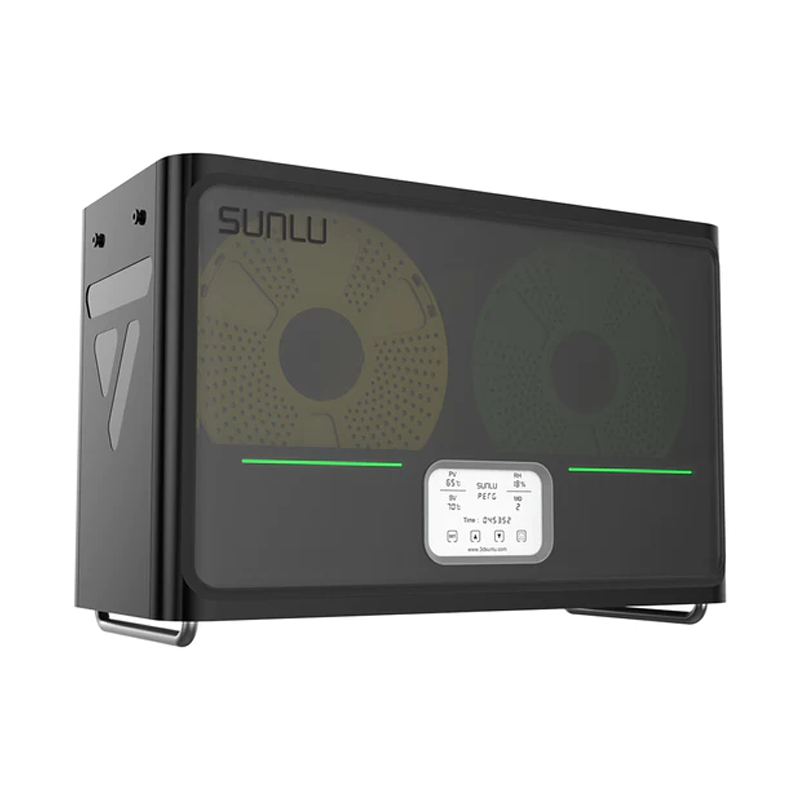
How the Sunlu S4 Filament Dryer Works ⚙️
The Sunlu S4 Filament Dryer works by heating the filament to a specific temperature, thereby removing moisture. This takes place in a closed system to ensure that the filament doesn't absorb moisture again during the drying process.
The dryer is very user-friendly: you simply place the filament inside, select the appropriate temperature, and let the device do the rest. The result is smooth, bubble-free prints.
Specifically, the S4 offers a temperature range of 35 to 70 °C, which is sufficient for the most common filament types. I typically dry PLA at 45 °C for 4–6 hours, PETG at 55 °C, and TPU at 50 °C. The built-in timer can be set for up to 24 hours, so you can easily run the dryer overnight. An integrated hygrometer displays the current humidity level inside, so you can see directly how effective the drying process is.
Advantages of the Sunlu S4 Filament Dryer 🎨
- Space for four filament spools: Also compatible with paper rolls
- Improved print quality: By drying the filament, you get smoother and more consistent prints without bubbles or uneven layers.
- Longer filament lifespan: Dried filaments are less susceptible to moisture absorption and remain usable longer. Tip: Use Spoolman to keep track of all your spools.
- Compatibility with various filaments: The Sunlu S4 is suitable for many filament types, including PLA, ABS, PETG, and more.
- Easy handling: The device is user-friendly and doesn't require complicated settings.
- PTFE tube support: The Sunlu S4 supports PTFE tubes, enabling smooth filament feeding to the printer. This is especially useful for long prints where the filament needs to stay dry continuously.
Comparison with Conventional Methods 🔄
Traditionally, wet filaments were often dried in the oven. However, this method is risky because the temperature is difficult to control and the filament can be damaged. The Sunlu S4 Filament Dryer offers a safer and more effective alternative.
Since I started using the Sunlu S4, I no longer have to worry about my filament melting or becoming unusable in the oven. The precise temperature control and simple operation make the S4 an indispensable part of my 3D printing setup.
Usage and Tips 🚀
To get the most out of the Sunlu S4 Filament Dryer, follow these steps:
- Insert filament: Place the filament in the dryer.
- Set temperature: Choose the appropriate temperature for your filament.
- Let it dry: Leave the filament in the dryer for the recommended time.
- Use it: After drying, you can use the filament immediately.
Another advantage of the Sunlu S4 is the wide selection of add-ons available on Printables. These add-ons extend the dryer's functionality and make it even more versatile.
My Experience with the Sunlu S4 Filament Dryer
I've been using the Sunlu S4 Filament Dryer since February and I'm thrilled with the results. Especially with TPU, which is particularly hygroscopic, the S4 has made an enormous difference: before, I regularly had stringing and a rough surface; now the prints are clean and smooth. My prints have been much more consistent and higher quality since then. No more bubbles, no more uneven layers, just perfect prints. I especially like how easy the S4 is to use and how seamlessly it integrated into my existing setup. The PTFE tube support enables smooth filament feeding, which is particularly helpful during longer prints.
Conclusion
The Sunlu S4 Filament Dryer is an indispensable tool for anyone who wants to achieve perfect results in 3D printing. By effectively removing moisture, it ensures consistent, bubble-free prints and extends the lifespan of your filaments. Whether you're an experienced 3D printer user or just getting started, the Sunlu S4 will revolutionize your prints.
There is one minor criticism, though: the fan noise is audible, although not disturbing. In a separate room, it's barely noticeable, but right next to the desk, it can become noticeable over time. Overall, however, the advantages clearly outweigh the drawbacks, for a price of around 80–90 €, you get a solid filament dryer that noticeably improves the 3D printing experience.