
Native CSS nesting is here, and it makes Sass obsolete for the most common use case (nesting selectors). All modern browsers support it. Time to simplify your build setup.
🤔 What Even Is CSS Nesting?
If you've ever used Sass or SCSS, you know the drill: nesting selectors inside each other to mirror your HTML structure in CSS. For years, that was the reason many developers reached for a preprocessor in the first place.
And now? Now CSS can do it natively. No compiler, no build step, no node_modules folder full of Sass dependencies. Just write CSS and it works.
📝 The Basics, What It Looks Like
The concept is simple: you write your child selectors directly inside the parent selector. Exactly like Sass.
.card {
  background: white;
  border-radius: 8px;

  .card-title {
    font-size: 1.5rem;
    font-weight: bold;
  }

  .card-body {
    padding: 1rem;
    line-height: 1.6;
  }
}
That's it. No special setup needed. Your browser just gets it.
🔗 The & Selector, Your Best Friend
Just like in Sass, native CSS has the & selector. It references the outer selector and is especially useful for pseudo-classes, pseudo-elements, and compound selectors.
.button {
  background: #3b82f6;
  color: white;
  transition: background 0.2s;

  &:hover {
    background: #2563eb;
  }

  &:focus-visible {
    outline: 2px solid #3b82f6;
    outline-offset: 2px;
  }

  &.button--large {
    padding: 1rem 2rem;
    font-size: 1.25rem;
  }

  &::after {
    content: " →";
  }
}
Quick note: for pseudo-classes and pseudo-elements, the & is actually optional, you can write :hover { } directly. But explicit beats implicit, right?
📏 Nesting Rules, What Works and What Doesn't
There are a few rules you should know:
Element selectors needed & or a relative syntax. You couldn't just write div { } inside a selector. Instead:
.container {
  /* This works: */
  & div {
    margin: 1rem;
  }

  /* With relaxed parsing (since 2024): */
  div {
    margin: 1rem;
  }
}
The so-called "relaxed nesting syntax" now allows bare element selectors in all modern browsers. Originally this wasn't possible, a leftover from the initial spec.
Deep nesting? Sure thing!
.page {
  .sidebar {
    .nav-item {
      color: gray;

      &:hover {
        color: black;
      }
    }
  }
}
But don't go overboard. Three levels deep is usually the max before your CSS becomes unreadable.
📱 Media Queries Inside Nesting
This is where it gets really exciting. You can nest media queries directly inside your selector. No more jumping back and forth between selectors and media queries!
.grid {
  display: grid;
  grid-template-columns: 1fr;
  gap: 1rem;

  @media (min-width: 768px) {
    grid-template-columns: repeat(2, 1fr);
  }

  @media (min-width: 1024px) {
    grid-template-columns: repeat(3, 1fr);
  }
}
For me personally, this is the biggest game changer. All styles for an element in one place. Brilliant.
⚔️ Sass Nesting vs. Native CSS Nesting, The Differences
At first glance, everything looks the same. But there are some subtle differences you should be aware of:
| Feature | Sass/SCSS | Native CSS |
|---|---|---|
String concatenation (&__element) | ✅ Yes | ❌ No |
| Nesting element selectors | ✅ Direct | ✅ Relaxed syntax (since 2024) |
| Nesting media queries | ✅ Yes | ✅ Yes |
| Variables | ✅ $var | ✅ var(--custom) |
| Mixins/Functions | ✅ Yes | ❌ No (yet) |
| Build step required | ✅ Always | ❌ Never |
| Specificity behavior | Flat (compiled) | Nested (like :is()) |
The biggest gotcha: in Sass, &__element compiles to .block__element. In native CSS, this does not work. The & is a real selector replacement, not string concatenation. If you're using BEM, you'll need to rethink your approach.
Also: specificity in native nesting behaves as if you were using :is(). This can lead to different results compared to compiled Sass in edge cases.
🪦 @nest, Short-Lived and Already Buried
If you've heard about the @nest rule: forget it. It was part of an early draft of the spec and was never implemented in browsers. Instead, we got the "relaxed nesting syntax," which is far more elegant.
The short version: previously, you had to explicitly prepend & for certain selectors. Today, that's optional in most cases.
🚀 Combined with Modern CSS, This Is Where It Gets Powerful
Native CSS nesting really shines when combined with other modern CSS features.
With CSS Variables
.theme-dark {
  --bg: #1a1a2e;
  --text: #e0e0e0;
  --accent: #e94560;

  .card {
    background: var(--bg);
    color: var(--text);

    .card-link {
      color: var(--accent);

      &:hover {
        opacity: 0.8;
      }
    }
  }
}With :has(), The "Parent Selector"
.form-group {
  border: 1px solid #ccc;

  &:has(input:invalid) {
    border-color: red;

    .error-message {
      display: block;
    }
  }

  &:has(input:focus) {
    border-color: #3b82f6;
    box-shadow: 0 0 0 3px rgba(59, 130, 246, 0.1);
  }
}
With Container Queries
.widget {
  container-type: inline-size;

  .widget-content {
    display: flex;
    flex-direction: column;

    @container (min-width: 400px) {
      flex-direction: row;
    }
  }
}
See the pattern? Everything that belongs to an element lives in one place. This is the dream of component-based CSS, without a JavaScript framework.
🔄 Migration Guide: Dropping Sass Nesting
Want to ditch Sass when you're only using it for nesting? Here's your plan:
1. Identify your Sass features. Are you really only using nesting? Or also mixins, functions, loops? If so, you probably still need Sass.
2. Replace &__element patterns. BEM concatenation doesn't work in native CSS. Write out the selectors:
/* Sass */
.block {
  &__element { color: red; }
  &--modifier { color: blue; }
}

/* Native CSS */
.block {
  .block__element { color: red; }
  .block--modifier { color: blue; }
}
3. Rename your files. From .scss to .css. Remove Sass-specific syntax like $variables and replace them with CSS Custom Properties.
4. Remove the Sass compiler. From your package.json, your Webpack/Vite config, everywhere.
5. Test thoroughly. Specificity might change. Watch out for edge cases.
🌐 Browser Support
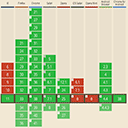
The good news: native CSS nesting is supported by all modern browsers.
Chrome 120+, Firefox 117+, Safari 17.2+, and Edge 120+ are all on board. That covers over 90% of users. The relaxed nesting syntax (no & needed for element selectors) has been available everywhere since mid-2024.
If you still need to support older browsers: the PostCSS Nesting Plugin can compile native nesting into flat CSS. Use the syntax today and stay compatible.

💡 Conclusion
Native CSS nesting is no longer an experiment, it's production-ready. If you've been using Sass just for nesting, there's no reason to keep it around. Your CSS gets simpler, your builds get faster, and your dependencies get fewer.
Sure, Sass still has its place for complex projects with mixins, functions, and loops. But for most projects, modern CSS is more than enough. And that's a good thing.
So go ahead. Nest away. Your bundler will thank you. 🚀